Follow these steps to load FOC's (Free of Charge)
Also use this rule when Tour Leader, Driver and/or Guide rates are dependent on the number of pax or rooms booked.
Let's use the following example to illustrate:
- for every 15 - 29 paying pax, 1 Single FOC applies
- 30 - 69 paying pax, 2 singles FOC applies
- 70 or more paying pax, 3 singles FOC applies
In Rate Rules
- Create the validity period, traveler age and any other applicable rules as normal
- Now click New Rate Rule and double click to select Free of Charge:
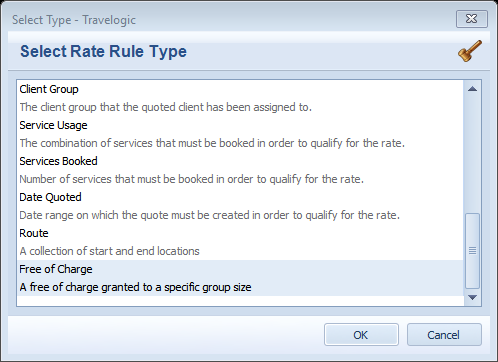
- Enter the Name for the first rule: 15-29 pax = 1 free
- Max Applications refers to the number of Free rooms applicable; in this case, it is 1
- Required refers to the minimum number of paying Pax or Room (Services) required before the FOC can be applied. In this case, a minimum of 15 Pax is required
- Click on the dropdown list and select Accommodation as the Service Type that the FOCs apply to
- Now select the Passenger Types that you would like the FOCs to apply to; in this case, I will apply it to Tour Leaders, Drivers and Guides
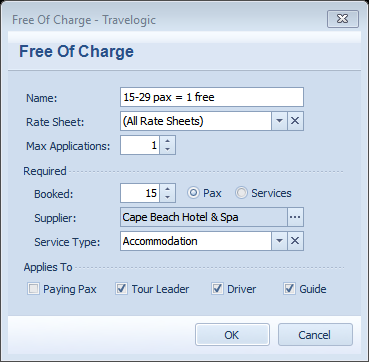
- Click OK
- Now repeat the process to create a rule for 30-69 pax and 70+ pax - this is what they should look like:
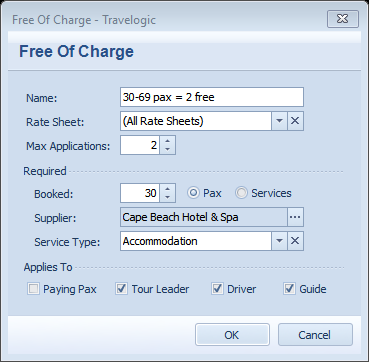

In Services
Create the services as normal
In the Rate Sheet
Add the rates for Per Person Sharing, Per Single and Per Extra Person/Child (if applicable) as normal
Now add the FOCs as follows:
- Click New, select the service and the Per Single basis type (the reason we use Per Single is because drivers, guides and tour leaders) are automatically allocated a Single Room in a Quotation
- Create 2 copies of this rate line by highlighting and clicking the Copy button at the top of the screen
- Apply the first FOC rule by right clicking on the rate line, selecting the Free of Charge rule, then select the first rule '15-29 pax = 1 free'

- Now repeat until you have applied all 3 Free of Charge rules
- Enter the applicable rate; in this case, it is zero

- Approve, Save and Close the ratesheet
How to use the FOCs in a Quotation
- Create a new Quotation; add enough passengers to qualify for the free of charge and also add a Tour Leader, Driver and Guide:

- Add the service to the Quote using Find or Add Services, selecting the date and duration
- Before you click OK switch to the Details tab and un-tick the 'Manually Allocate Driver / Guide' tickboxes to ensure the driver and guide are allocated to this service:
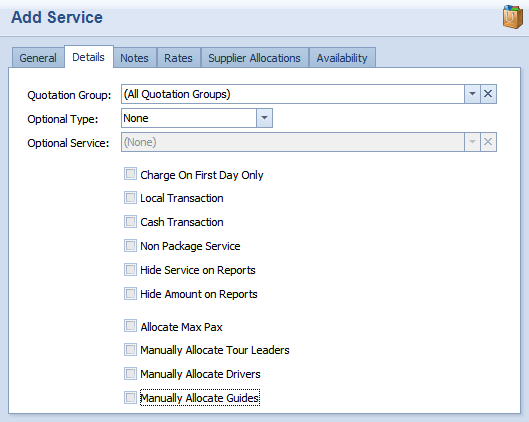
Click OK and add the service to the quote
Click on the +sign to show the list of allocations - note that 1 FOC has been applied to either the Tour Leader, Driver or Guide:

Remember the number of FOCs will depend on the number of pax allocated to this service.